 Screenpresso


Eine neue Version ist verfügbar
Klicken Sie hier, um die neueste Version zu sehen (2.3.6.0)Screenpresso 1.8.1
19. Juni 2020
Migration to Microsoft .NET 4.8 Framework
Following Microsoft updates for performance and security, Screenpresso runs now on .NET 4.8 framework.
- Install the latest version of the .NET Framework on your computer using this Microsoft link if you are not using Windows 10.
- If you are using Windows 10, you already have the right version.
- If you want to know which frameworks you have, you can use this tool.
Others
- Added "NoOcr" policy
- Added "MergeVideos" command line
- Color picker: removed the '#' character in the captured color value
- Capture: fixed ScreenshotDelay feature
- Workspace: added a tooltip to explain how to organize up or down the workspaces
- Editor: fixed the canvas when cropping outside the original content
- Editor: fixed an issue with the zoom
- Editor: fixed a crash when deleting all numbered items
- Video: fixed error message when the disk is full
- Workspace: the window is not topmost anymore
- Sharing: fixed an issue with Evernote
- Changed default value of advanced setting named "SnappingDepth" from 1 to 2
- Added NoErrorReportingEmail policy
- Improved the clipboard
- Improved Live Update engine
- Improved FIPS support
- Restored version to Windows' field named "ProductInfo"
- Updated to the latest version of NAudio library for better sound recording
Screenpresso 1.8.0
29. Mai 2020
Migration to Microsoft .NET 4.8 Framework
Following Microsoft updates for performance and security, Screenpresso runs now on .NET 4.8 framework.
- Install the latest version of the .NET Framework on your computer using this Microsoft link if you are not using Windows 10.
- If you are using Windows 10, you already have the right version.
- If you want to know which frameworks you have, you can use this tool.
Capture
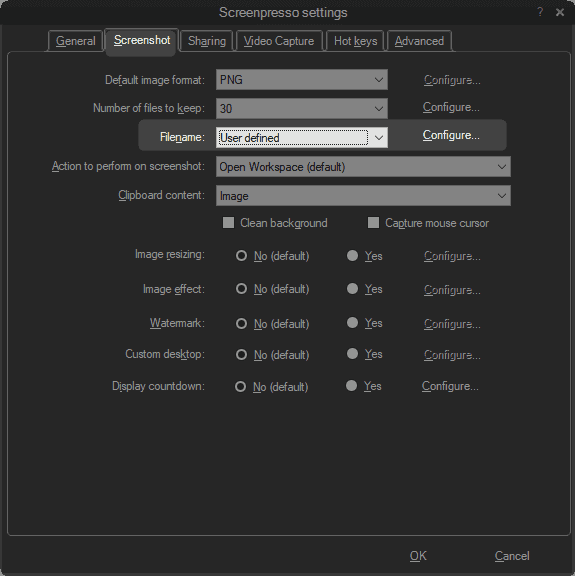
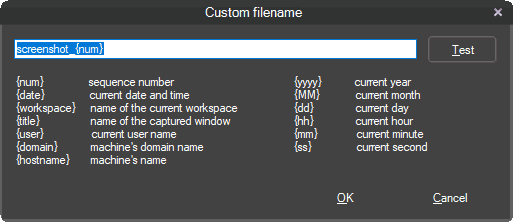
Improved custom filename
The configuration of a custom filename for screenshots is enhanced, and more options are available.
- Choose "User-defined" and click on the configure button:
- Define your filename pattern with predefined placeholders:
The 2 minutes limit length for animated gif is removed
Animated GIFs should be short and lightweight. That's why we recommend keeping GIFs video under 2 minutes length. However, Screenpresso does not hard limit it anymore.
New "VideoPauseBeforeStop" advanced settings
You can resume the video recording when you stop it. The stop button acts as a pause button, and a second confirmation is needed to finalize the video.

New "SnappingDepth" advanced settings
When you start a capture, moving the mouse over a window selects it. If you set the depth value to 1 you can select the child window of this root window by moving the mouse over it. If you set a value to 2, you can select a child window of this child window, and so on... The default value is 1 but to capture only root windows in one click, you might prefer to set it to 0.
A new What's new? dialog has been added
When a new version is available, the release note is now shown directly in Screenpresso.
Updated third parties components
- The OCR is now based on Tesseract 5-alpha.
- The Google SDK v3 is now used for Google drive and Youtube integration.
Bug fixes
- Due to instabilities on Windows APIs, the Direct MP4 recording option is not supported anymore over Windows 8.
- Improved the clipboard engine. Sometimes the content was not set resulting to an empty clipboard.
- The "Reset all settings" button was not workink propertly (sharing settings were not resetted).
- The video recorder was sometimes crashing due to audio issues.
- A display issue has been fixed when printing from the workspace.
- The Check for Update window size has been fixed for windows users with font size greater than 100%.
Other embeded technologies
New interprocess communication engine
Screenpresso uses a new communication framework for interprocess communciation. It will improve performance and security.
New internal logger
As you may have seen it using the beta version of Screenpresso, we now use a new internal logger to help us diagnose issues and fix bugs.
Faster install and uninstall
Screenpresso was already quick to install, but it is even faster now on this 1.8 version.
Screenpresso 1.7.16
17. Februar 2020
- Editor: update OCR Tesserac to version 5-alpha
- New display for release notes
- Added 'OpenFileExplorerAfterProcessing' advanced setting
- Fixed an issue with latest security Microsoft patch for Windows 7
- Fixed gif video issue when video clipping was applied at the same time
- Fixed Android video recording occuring with some mobile phones
Screenpresso 1.7.15
5. Januar 2020
- Improved memory usage (some bitmaps are freed more quickly)
- Fixed wrong FFmpeg version in MSI install
Screenpresso 1.7.14
17. Dezember 2019
- Fixed a bug with policies and pro license
- Removed support for Hightail sharing service since they don't provide an API anymore
- Release notes is now displayed in Screenpresso when a new official release is available
Screenpresso 1.7.13
4. Dezember 2019
-
Screen resolution (DPI) is now set into the captured image file
-
Screen resolution (DPI) is now taken into account when drawing mouse cursor
-
When FFmpeg must be re-installed, now a message explains why
-
Fixed policies not applied at startup
-
Fixed app not starting with Windows on some computers
Screenpresso 1.7.12
12. November 2019
- Fixed issue with settings
- Fixed display of tools in built-in image editor
- Restored "Check for beta update" checkbox in About Box dialog
Screenpresso 1.7.11
5. November 2019
- Fix the startup issue when no settings.xml exist.
Screenpresso 1.7.10
1. November 2019
Fix a set of minor bugs.
Screenpresso 1.7.9
5. Oktober 2019
This version is mainly a bug fixes release.
Capture
Fixed lag at video recording's startup
When "Direct MP4 recording" option is checked, there was a lag during about 0.3 seconds at the very beginning of the record.
Fixed issue with automatic merge at the end of video recording
A new feature of the previous release is for Screenpresso to merge automatically multiple AVI files when Direct MP4 recording option is not checked and a long video recording ends. This new feature introduced a bug preventing the video preview from being displayed.
Editor
Added dash-dot line style
For lines, circles, rectangles and polygons, it is possible to set a plain or a dash line style. Now we added the dash-dot line style.
Added Ctrl+C shortcut
Ctrl+C now copies to clipboard selected item or the whole image.
Sharing
Fixed Google Drive public permission
When you upload a media to Google Drive thanks to Screenpresso's build-in publish feature, you can request it to be publicly available. This feature was not working properly and is now fixed.
Removed ScreenpressoCloud banner (pro)
If you are a Screenpresso PRO user and publish a media to ScreenpressoCloud, the hosting Web page won't display a banner advertising Screenpresso anymore.
Upgraded ScreenpressoCloud max file size
The maximum file size has been changed from 20MB to 50MB.
Settings
Smaller settings.xml file
Now the settings.xml file storing all your settings is much smaller because it does not contain default values anymore (settings that you haven't changed are not saved to the file anymore).
Fixed proxy error message
When a proxy setting does not work, there is now a better error message.
About box saves previous choices
About box window now remembers whether you checked Check for beta option or not. Previously this setting was always checked when you opened the window.
Others
Fixed German and Dutch translations
ScreenpressoRcp.exe is now 64 bits
ScreenpressoRpc.exe is a software used when Screenpresso.exe is installed in Program Files folder. Previously it was running as a 32 bits software even under Windows 64 bits.
Screenpresso 1.7.8
2. September 2019
Capture
Automatic merge of mp4 files when multiple files have been generated during video recording
When "Direct MP4 recording" option is not checked, Screenpresso records video in AVI file format. This format limits the file size to 2GB. Therefore Screenpresso may produce several AVI files during one recording session. Previous to 1.7.8, Screenpresso was generating as many MP4 files as AVI files at the end of the recording session. This new version enhances the conversion pipeline and produces one single MP4 file.
Generation of GIF video is now much quicker and better
Screenpresso uses a brand new processing engine to generate GIF file quicker with higher quality. Ghosting artifacts have been reduced, and the dependancy on ImageMagick third party has been removed.
Upgraded version of FFmpeg and ADB
Screenpresso uses FFmpeg third party for some video conversion tasks. We now use the version 4.1.4.
To record videos or take screenshots on Android devices, Screenpresso relies on Android Debug Bridge (ADB) third party. Screenpresso now uses the version 1.0.41 of ADB to be able to communicate with the latest versions of Android devices.
Automatic Update
Enhanced Check for update
A new option has been added to choose between the official or the beta releases.
Screenpresso already features an automatic update engine so new official releases are progressively deployed on each screenpresso installation. However, the user can force the update by clicking on Check for update button in the About Box dialog.
Previous to 1.7.8, beta versions and official versions were available behind the same update button. Starting with 1.7.8, the user can now choose to get only official releases. Latest beta releases can be used for testing purposes and may include feature preview of Screenpresso 2.0 (v2).
The release date of the v2 version has not been disclosed yet.
Editor
Numbering items can now be displayed in Roman (in addition to number and letter)
You can add numbering items to your screen captures in 3 formats:
- Numbers: 1, 2, 3, 4...
- Letters: A, B, C, D...
- Romans: I, II, III, IV...
Policies
Administrators can now fine-tune which sharing features are available or disabled
IT administrator can disable Google Drive and Evernote sharing features and remain OneDrive and OneNote sharing features available.
Please refer to the user manual (press F1 key from Screenpresso to open it) or run the command line Screenpresso.exe /policies to generate a sample registry file.
Security
All Web calls are based on TLSv1.2 protocol.
Screenpresso will use the latest version of HTTPS protocol supported by your operating system.
Advanced settings
3 advanced settings have been added.
EditorSingleInstance
The EditorSingleInstance option set to True will force Screenpresso to edit images always in the same editor instance instead of opening multiple windows.
WorkspaceCloseOnEdit
If you set WorkspaceCloseOnEdit to False then the workspace window will remain open when you double-click a media to open it (a media is an image, a video or a document).
ScreenshotHideCursor
If you set ScreenshotHideCursor to False, the standard mouse cursor will be used to define the capture region instead of the crosshairs (default).
