 Screenpresso


October 1, 2026
2.3.7.0
-
Image Editor:
- Added the Backspace key to delete the selected item
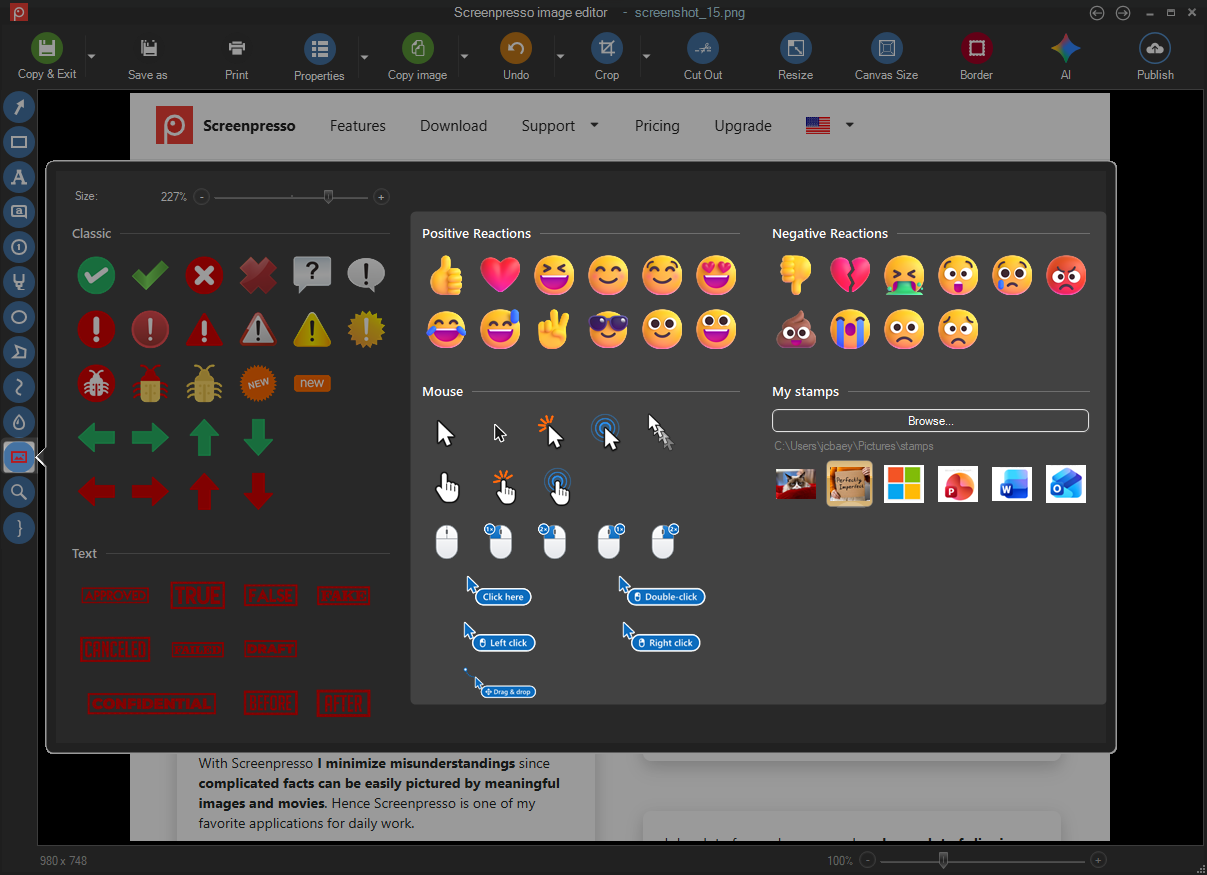
- Refactor the stamp picker layout, added fresh new stamps and added a section for your custom ones.
-
Workspace:
- Keep aspect ration on preview image
- Added a side panel button that shows or hides the workspaces panel
- Enhancement of the look and feel
- Added thumbnails size management in the workspace settings menu (in addition to the Ctrl++ and Ctrl+- shortcuts and Ctrl+mouse wheel).
-
Video capture:
- Apply the same mouse click visual effects on new record engine as the existing ones in legacy captures
- Indicating when the record engine is not ready yet at in the video toolbar
- Adding Pause and Redo in the video toolbar
- Webcam: enhance context menu (shape/position)
- Webcam: fix the the webcam position issue
- Webcam: adding a "mirror video" option
- Added the Hide all desktop icons checkbox to custom desktop settings.
- Added temporary desktop icon hiding through the desktop settings contract and preserved the original visibility during restoration.
-
Video format:
- Refresh the suggested video dimensions in the video toolbar as well as in the format video dialog
- Renew the file format icons in the format video dialog
-
Document generator:
- renew the file format icons
-
Image OCR:
- Fixed recognition of images exceeding Windows OCR's maximum dimensions.
- Removed the Tesseract legacy OCR.
-
Sharing
- Migrated OneDrive operations to Microsoft Graph and added Dropbox and Imgur token expiry and refresh handling.
-
Others
- Added the NoAI policy and command-line options for policy export and suppressing the workspace after capture.
Downloads for 2.3.7.0
September 22, 2026
2.3.6.0
-
Restored LastScreenshotRegion advanced setting
-
Fixed a rare issue displayed when the workspace was opening
-
Fixed some windows opening behind the workspace
September 18, 2026
2.3.5.0
-
Fixed Webcam display issue with high dpi screens
-
Restored email sharing
-
Added a solution window when the working folder is read only
August 28, 2026
2.3.4.0
-
Fix white screen during capture in some specific cases
-
Fix incorrect display size during capture in some specific cases
-
Fix video recording for graphic cards not supporting hardware acceleration
-
Restored Script sharing feature
August 2, 2026
2.3.3.0
-
Fix restart of Screenpresso when the computer resumes from sleep mode
-
Fix custom filename issue in Spanish
-
Improve video recording stability
July 24, 2026
2.3.2.0
- Fixed a language issue
July 23, 2026
2.3.1.0
Bug fixes
-
Fix clipboard issue
-
Fix window capture when in compatibility mode
-
Added a button in the settings window to open "Start with window" setting
July 17, 2026
2.3.0.0
Important notice
Screnpresso is now packaged into a msix install. It cannot be run in portable mode anymore.
Previous versions cannot automatically update to the new versions, so you must manually uninstall your current Screenpresso then download and install the new one. Live update will then be automatic thanks to the Microsoft msix engine.
Advantages of the new installer mechanism:
- Consistent: no more live downloads when required. Screenpresso is fully downloaded and installed in one step.
- Secure: it installs to the Program Files folder without requiring elevated priviledges because it is done by Microsoft and also because the software is then run inside a sandbox (container) that cannot modify your computer without your explicit consent.
- Fast: it deploys quickly and, when updating, downloads and installs only changes instead of the whole software.
- Transparent: live updates are done automatically and in background by Microsoft so you always have the latest version of Screenpresso without having to do anything.
Constraints of the new installer mechanism:
- Screenpresso cannot change the system's settings anymore for you so it will ask you do the changes when needed.
- To use a beta release or a specific version of Screenpresso you have to uninstall then install another package provided on our official web site.
- Since Chocolatey does not support msix packages yet, we have decommissioned it. For the moment you should prefer WinGet instead.
New features
-
Whole new installation engine based on Microsoft MSIX technology
-
The file activation.lic must now be stored in the folder C:\ProgramData\Screenpresso and not next to Screenpresso.exe anymore
-
Screenpresso is now based on the latest Microsoft .NET 10 framework and new libraries. This is a major internal change
-
Added native support for ARM64 processors (no emulation)
-
Added support for Microsoft OneDrive Business edition
-
Removed support for Microsoft OneNote
-
New design for the settings window
June 12, 2026
2.2.13
Important information for the futur releases
This is one of the latest automatic live update based on the current mechanism. Since the next official release will be only distributed via a Microsoft MSIX installer, you will soon have to manually uninstall your Screenpresso then install the new one to upgrade your version.
Improvements
-
Improved ScreenpressoCloud uploads performances.
-
Improved HDR screens support.
Bug fixes
-
Fixed an issue for Linear sharing.
-
Fixed the "Close" tooltip for the close button at the upper-right of all windows that was sometimes not hidden when it should.
May 19, 2026
2.2.12
Bug fixes.
May 17, 2026
2.2.11
Bug fixes to support more GPU types.
